Ergonomic mouse are designed to ease wrist strain, promote a more natural hand posture, and keep you comfortable through long work or gaming sessions.
In 2026, reviewers still recommend a mix of vertical, sculpted, and contour-style designs that reduce repetitive strain and boost productivity or performance.
This guide picks the best ergonomic mice in three clear price tiers and includes real expert insights from ongoing ergonomic mouse testing.
Best Ergonomic Mouse Under $50
Ergonomic mice under $50 prove that comfort doesn’t have to come with a high price tag, with many budget models offering thoughtful shapes and reduced wrist strain compared with generic flat mice. Reviewers and users alike frequently recommend affordable options – from vertical designs to contoured wireless picks – that make using your computer easier and more comfortable throughout the day.
1. Lekvey Ergonomic Mouse – Top Budget Vertical Comfort Pick
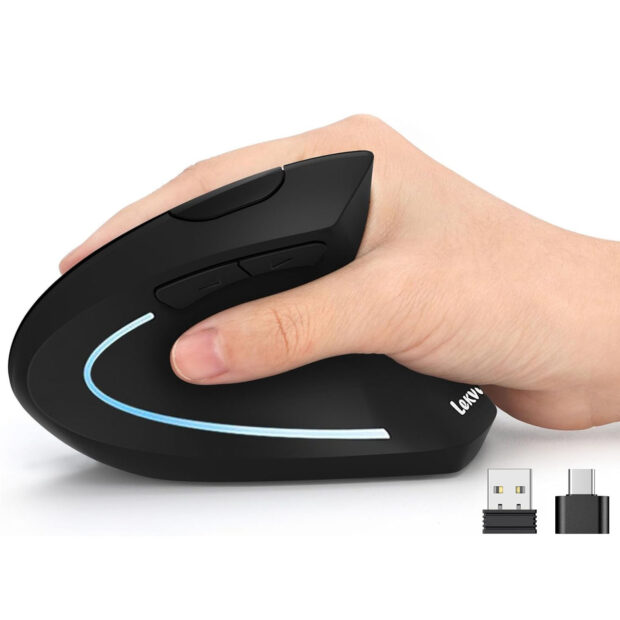
The Lekvey Ergonomic Mouse is a vertical wireless model that makes true ergonomic advantages affordable. Its handshake-style design places your wrist in a more natural, relaxed posture to help reduce strain and discomfort compared with flat stock mice, and reviewers note its design can significantly ease wrist pain once you adapt to the vertical orientation.
If you want an ergonomic wireless mouse that stays quiet and unobtrusive during long sessions, this model delivers that experience with broad compatibility across laptops and desktops.
- Vertical ergonomic shape that encourages a neutral “handshake” wrist position, helping reduce strain during extended use
- Dual-mode wireless with USB-A and USB-C compatibility for broad device support
- Rechargeable 600 mAh battery provides up to ~150 hours of continuous use on a single charge
- Adjustable DPI (1000 / 1200 / 1600) for personalized sensitivity
- Six buttons including forward/back navigation for easier web browsing and productivity
- Optical tracking with reliable responsiveness and plug-and-play setup
Ideal for: Users seeking an ergonomic vertical solution under $50 that helps mitigate wrist pain and repetitive fatigue, especially if you’re new to vertical designs and want straightforward wireless comfort.
2. Microsoft Bluetooth Ergonomic Mouse
For anyone seeking a solid ergonomic mouse without spending much, Microsoft’s Bluetooth ergonomic design delivers comfort and reliable performance at a wallet-friendly price. This contoured mouse promotes a more natural wrist position than generic flat designs, making it a strong pick for everyday office and home use.
- Sculpted ergonomic shape that supports your palm and wrist
- Reliable Bluetooth wireless connectivity
- Simple, quiet buttons for general productivity
- Lightweight and portable
- Works well with both Windows and macOS
Ideal for: Budget-minded workers, students, remote professionals, or anyone who wants improved comfort over stock mice without extra features.
3. Keychron M6 Wireless Mouse
The Keychron M6 packs surprising value under fifty dollars, with wireless convenience and a comfortable ergonomic profile. While it’s not a dedicated vertical mouse, its gently contoured shape helps reduce wrist fatigue compared with typical flat designs — a great choice when combined with its strong user ratings.
- Invitation-style ergonomic shape
- Wireless connectivity via 2.4 GHz or Bluetooth
- Long battery life and solid tracking
- Minimalistic yet functional design
Ideal for: Remote workers and light gamers who want a more comfortable daily mouse on a strict budget.
Best Ergonomic Mice Under $100
These are the best picks that are in the middle price range.
1. Logitech Lift Vertical Ergonomic Wireless Mouse
The Logitech Lift is one of the most-recommended mid-range ergonomic mice you can buy. Its vertical handshake design places your wrist in a neutral position to reduce pronation and forearm tension — an approach ergonomic specialists now prefer for long hours of use.
- Vertical “handshake” ergonomic design to reduce wrist strain
- Wireless via Bluetooth or USB receiver
- Comfortable for small to medium hands
- Quiet clicks and responsive tracking
- Multi-device pairing support
Ideal for: Office users, programmers, writers, and professionals who spend most of their day navigating documents and spreadsheets.
2. Logitech MX Master 3S Wireless Mouse
A perennial favorite among productivity users, the MX Master 3S blends ergonomic comfort with advanced features like precise scrolling, customizable buttons, and excellent tracking. It’s slightly above classic budget models, but expert guides still rank this series among the top overall ergonomic mice thanks to its sculpted silhouette and multi-device support.
- Sculpted ergonomic design with thumb rest
- Ultra-responsive sensor and scroll wheel
- Connects up to three devices
- Long battery life
- Deep customization via software
Ideal for: Power users and multitaskers who want an ergonomic upgrade plus productivity enhancements.
Best Ergonomic Mice Under $150
Looking at ergonomic mice under $150 brings you to models that blend thoughtful comfort design with dependable performance and extra features that improve everyday computing. Many expert reviewers highlight that at this price point you get well-built options with solid tracking, responsive buttons, and shapes that support your hand comfortably through long work sessions.
1. Logitech MX Master 4 – (Expert Pick, Great Comfort and Features)
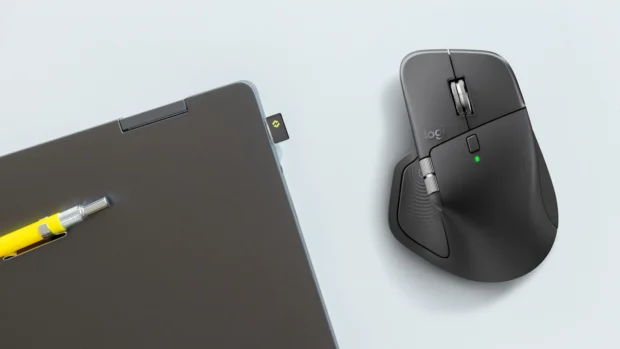
If you’re willing to stretch your budget just under $150 (and often find deals that bring it there), the Logitech MX Master 4 stands out as one of the best ergonomic mice tested for 2026. Reviewers note its sculpted right-handed design, dual scroll wheels (horizontal and vertical), and customizable gesture controls.
- Premium ergonomic shape with extensive support
- Dual scroll wheels for versatile navigation
- Gesture controls for workflow efficiency
- Excellent build quality and battery life
- Wireless with multi-device support
Ideal for: Creatives, professionals, and anyone looking for the best balance of comfort and advanced control features.
2. HP 920 Ergonomic Vertical Mouse – Trusted Brand Vertical Pick
The HP 920 Ergonomic Vertical Mouse brings a refined vertical design from a major brand that focuses on long-term comfort and office reliability. Its 57° vertical angle promotes a relaxed “handshake” posture, helping reduce wrist pronation and forearm tension during extended work sessions. Unlike cheaper vertical mice, reviewers highlight its solid build quality, precise tracking, and dependable wireless performance across multiple devices.
This model fits naturally into professional setups where comfort, brand trust, and consistency matter more than flashy extras. It keeps the learning curve low while delivering genuine ergonomic benefits for daily productivity.
Key features and benefits:
- Vertical ergonomic shape with a natural 57° tilt for improved wrist alignment
- Dual wireless connectivity via Bluetooth and USB-A receiver
- High-precision optical sensor with adjustable DPI settings
- Quiet, responsive buttons suited for office and home work
- Rechargeable battery designed for long work cycles without frequent charging
Ideal for: Professionals, remote workers, and office users who want a reliable vertical ergonomic mouse from a trusted brand, without stepping into premium pricing territory.
What to Look For in an Ergonomic Mouse
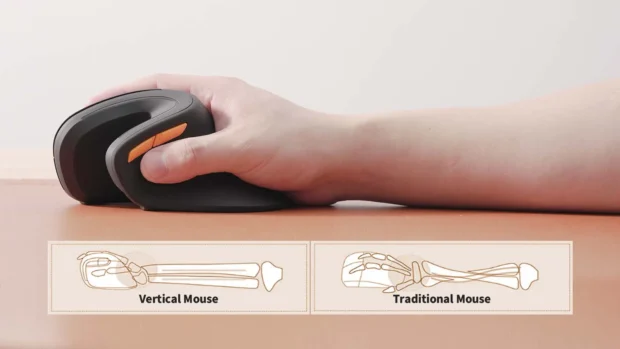
Purchasing an ergonomic mouse involves more than price. Here are the biggest factors that affect comfort and usability:
1. Posture and Wrist Alignment
Vertical designs tilt your hand so the wrist stays in a more neutral “handshake” orientation, which is well-documented to reduce forearm tension and help prevent repetitive strain.
2. Connectivity
Decide whether you want Bluetooth, a 2.4 GHz USB receiver, or both. Bluetooth saves a USB port, while receivers can offer more stable connectivity with less latency.
3. Buttons and Productivity Features
Extra buttons, programmable switches, and horizontal scroll wheels enhance productivity. They’re especially useful if you work with large spreadsheets or creative software.
4. Hand Size and Shape
Ergonomic doesn’t mean one-size-fits-all. Smaller hands may prefer compact vertical models, while larger hands benefit from full-size sculpted mice.
5. Battery Life
Wireless ergonomic mice vary from replaceable batteries that last months to rechargeable ones that require frequent charging. Consider your tolerance for charging downtime.
Summary
Picking the best ergonomic mouse in 2026 means finding a tool that supports your hand and wrist comfortably throughout long hours at the computer. The models here span a range of prices and features, but all are designed to make everyday computing easier and more comfortable.
Ergonomic designs can help reduce muscle strain and promote a more natural hand and wrist posture, which many users find valuable over repeated use and extended sessions at work or home.